linux 目录结构

本篇博客仅以个人学习记录使用

  1. / 根目录
    每一个文件和目录都是从根目录开始,但是只有root用户具有该目录下的写权限,这里需要注意的是/root是root用户的主目录,这与/.不一样,cd /. 或者 cd / 进入根目录 使用ll命令即可看到/root目录。 cd ~ 及为进入root目录

  2. ~ root目录

  3. /bin中 - 用户的二进制文件,包含了二进制的可执行文件,在单用户模式下,需要使用的常见linux命令都位于此目录下。系统的所有用户使用的命令都在这里,例如:ps, cp

  4. /sbin - 系统的二进制文件,就行/bin,/sbin同样也包含二进制可执行文件。但是,在这个目录下的linux命令通常由管理员使用,对系统进行维护,例如:iptables、reboot、fdisk、ifconfig、swapon命令

  5. /etc - 配置文件 包含了所有程序所需的配置文件,也包含了用于启动/停止单个程序的启动和关闭shell脚本。例如:/etc/resolv.conf、/etc/logrotate.conf。重要的配置文件有 /etc/inittab、/etc/fstab、/etc/init.d、/etc/X11、/etc/sysconfig、/etc/xinetd.d修改配置文件之前记得备份。注:/etc/X11 存放与 x windows 有关的设置。

  6. /dev - 设备文件,包括设备文件。这些包括终端设备,usb或连接到系统的任何设备。例如:/dev/tty1、/dev/usbmon0。访问该目录下某个文件,相当于访问某个设备,常用的是挂载光驱 mount /dev/cdrom /mnt

  7. /pro - 进程信息,包含系统进程的相关信息。这是一个虚拟的文件系统,包含有关正在运行的进程的信息。例如:/proc/{pid}目录中包含的与特定pid相关的信息。系统资源都是以文本形式存在的。例如:/proc/uptime

  8. /var - 变量文件,这个目录可以找到内容可能增长的文件,这包括:系统日志文件(/var/log);包和数据库文件(/var/lib);电子邮件(/var/mail);打印队列(/var/spool);锁文件(/var/lock);多次重新启动需要的临时文件(/var/tmp)。某些大文件的溢出区,比方说各种服务的日志文件

  9. /tmp - 临时文件,包含系统和用户创建的临时文件,当系统重新启动时,这个目录下的文件都将被删除

  10. /usr - 用户程序,包含二进制文件、库文件、文档和二级程序的源代码。

    /usr/bin中包含用户程序的二进制文件。如果你在/bin中找不到用户二进制文件,到usr/bin目录看看。例如:at、awk、cc、less、scp。

    /usr/sbin中包含系统管理员的二进制文件。如果你在/sbin中找不到系统二进制文件,到/usr/sbin目录看看。例如:atd、cron、sshd、useradd、userdel。

    /usr/lib中包含了/usr/bin和/usr/sbin用到的库。

    /usr/local中包含了从源安装的用户程序。例如,当你从源安装Apache,它会在/usr/local/apache2中

  11. /home - HOME目录。 所有用户用home目录来存储他们的个人档案。 例如:/home/john、/home/nikita。系统默认的用户家目录,新增用户账号时,用户的家目录都存放在此目录下,表示当前用户的家目录,edu 表示用户 edu 的家目录。建议单独分区,并设置较大的磁盘空间,方便用户存放数据

  12. /boot - 引导加载程序文件。包含引导加载程序相关的文件(也就是linux系统启动时的一些文件)。内核的initrd、vmlinux、grub文件位于/boot下。例如:initrd.img-2.6.32-24-generic、vmlinuz-2.6.32-24-generic

  13. /lib - 系统库。包含支持位于/bin和/sbin下的二进制文件的库文件.库文件名为 ld或lib.so.*例如:ld-2.11.1.so,libncurses.so.5.7

  14. /opt - 可选的附加应用程序。opt代表可选的,包含从个别厂商的附加应用程序。附加应用程序应该安装在/opt/或者/opt/的子目录下。给主机额外安装软件所摆放的目录。如:FC4使用的Fedora 社群开发软件,如果想要自行安装新的 KDE 桌面软件,可以将该软件安装在该目录下。以前的 Linux 系统中,习惯放置在 /usr/local 目录下。

  15. /mnt - 挂载目录。临时安装目录,系统管理员可以挂载文件系统。系统提供这个目录是让用户临时挂载其他的文件系统

  16. /media - 可移动媒体设备。用于挂载可移动设备的临时目录。举例来说,挂载CD-ROM的/media/cdrom,挂载软盘驱动器的/media/floppy;

  17. /srv - 服务数据。srv代表服务。包含服务器特定服务相关的数据。例如,/srv/cvs包含cvs相关的数据。服务启动之后需要访问的数据目录,如 www 服务需要访问的网页数据存放在 /srv/www 内

  18. /lost+fount:系统异常产生错误时,会将一些遗失的片段放置于此目录下,通常这个目录会自动出现在装置目录下。如加载硬盘于 /disk 中,此目录下就会自动产生目录 /disk/lost+found。这个目录平时是空的,系统非正常关机而留下“无家可归”的文件(windows下叫什么.chk)就在这里

  19. /mnt: /media:光盘默认挂载点,通常光盘挂载于 /mnt/cdrom 下,也不一定,可以选择任意位置进行挂载。

  20. /proc:此目录的数据都在内存中,如系统核心,外部设备,网络状态,由于数据都存放于内存中,所以不占用磁盘空间,比较重要的目录有 /proc/cpuinfo、/proc/interrupts、/proc/dma、/proc/ioports、/proc/net/* 等。虚拟的目录,是系统内存的映射。可直接访问这个目录来获取系统信息

一切皆文件

Linux 对数据文件(.mp3、.bmp),程序文件(.c、.h、*.o),设备文件(LCD、触摸屏、鼠标),网络文件( socket ) 等的管理都抽象为文件,使用统一的方式方法管理。

文件分类:

1)普通文件( 数据文件 ):普通文件是用于存放数据、程序等信息的文件,一般都长期地存放在外存储器(磁盘)中。普通文件又分为文本文件和二进制文件。
2)目录文件:目录文件是文件系统中一个目录所包含的目录项所组成的文件。
3)设备文件:设备文件是用于为操作系统与设备提供连接的一种文件。在linux系统中将设备作为文件来处理,操作设备就像操作普通文件一样。每一个设备对应一个设备文件。存放在/dev目录中。
4)连接文件:似于windows下的快捷方式,链接又可以分为软连接(符号链接)和硬链接
5)管道文件:管道文件主要用于在进程间传递数据的一种特殊文件
6)套接口文件:主要用于不同计算机网络通信的一种特殊文件

linux软件安装

Linux 的软件安装目录是也是有讲究的,理解这一点,在对系统管理是有益的

/usr:系统级的目录,可以理解为C:/Windows/,/usr/lib理解为C:/Windows/System32。
/usr/local:用户级的程序目录,可以理解为C:/Progrem Files/。用户自己编译的软件默认会安装到这个目录下。
/opt:用户级的程序目录,可以理解为D:/Software,opt有可选的意思,这里可以用于放置第三方大型软件(或游戏),当你不需要时,直接rm -rf掉即可。在硬盘容量不够时,也可将/opt单独挂载到其他磁盘上使用。

源码放哪里?
/usr/src:系统级的源码目录。
/usr/local/src:用户级的源码目录

1
2
3
4
5
/opt

Here’s where optional stuff is put. Trying out the latest Firefox beta? Install it to /opt where you can delete it without affecting other settings. Programs in here usually live inside a single folder whick contains all of their data, libraries, etc.
这里主要存放那些可选的程序。你想尝试最新的firefox测试版吗?那就装到/opt目录下吧,这样,当你尝试完,想删掉firefox的时候,你就可 以直接删除它,而不影响系统其他任何设置。安装到/opt目录下的程序,它所有的数据、库文件等等都是放在同个目录下面。
举个例子:刚才装的测试版firefox,就可以装到/opt/firefox_beta目录下,/opt/firefox_beta目录下面就包含了运 行firefox所需要的所有文件、库、数据等等。要删除firefox的时候,你只需删除/opt/firefox_beta目录即可,非常简单。
1
2
3
4
5
/usr/local

This is where most manually installed(ie. outside of your package manager) software goes. It has the same structure as /usr. It is a good idea to leave /usr to your package manager and put any custom scripts and things into /usr/local, since nothing important normally lives in /usr/local.

这里主要存放那些手动安装的软件,即不是通过“新立得”或apt-get安装的软件。它和/usr目录具有相类似的目录结构。让软件包管理器来管理/usr目录,而把自定义的脚本(scripts)放到/usr/local目录下面,我想这应该是个不错的主意。

linux wget 命令介绍

本篇博客仅以个人学习记录使用
原文链接:https://www.cnblogs.com/ginvip/p/6350189.html

Linux wget是一个下载文件的工具,它用在命令行下。对于Linux用户是必不可少的工具,尤其对于网络管理员,经常要下载一些软件或从远程服务器恢复备份到本地服务器。如果我们使用虚拟主机,处理这样的事务我们只能先从远程服务器下载到我们电脑磁盘,然后再用ftp工具上传到服务器。这样既浪费时间又浪费精力,那不没办法的事。而到了Linux VPS,它则可以直接下载到服务器而不用经过上传这一步。wget工具体积小但功能完善,它支持断点下载功能,同时支持FTP和HTTP下载方式,支持代理服务器和设置起来方便简单。下面我们以实例的形式说明怎么使用wget。

1.使用wget下载单个文件,以下的例子是从网络下载一个文件并保存在当前目录

1
2
3
4
1.wget http://cn.wordpress.org/wordpress-3.1-zh_CN.zip
2.wget -P /tools http://cn.wordpress.org/wordpress-3.1-zh_CN.zip
-P 指定下载到哪个目录
在下载的过程中会显示进度条,包含(下载完成百分比,已经下载的字节,当前下载速度,剩余下载时间)

2、使用wget -O下载并以不同的文件名保存,wget默认会以最后一个符合”/”的后面的字符来命令,对于动态链接的下载通常文件名会不正确。

1
2
3
错误:下面的例子会下载一个文件并以名称download.php?id=1080保存
1.wget https://www.centos.bz/download?id=1
即使下载的文件是zip格式,它仍然以download.php?id=1080命令。
1
2
正确:为了解决这个问题,我们可以使用参数-O来指定一个文件名
1.wget -O wordpress.zip https://www.centos.bz/download.php?id=1080

3.使用wget –limit -rate限速下载,当你执行wget的时候,它默认会占用全部可能的宽带下载。但是当你准备下载一个大文件,而你还需要下载其它文件时就有必要限速了

1
1.wget --limit-rate=300k http://cn.wordpress.org/wordpress-3.1-zh_CN.zip

4.使用wget -c断点续传,使用wget -c重新启动下载中断的文件:

1
2
wget -c http://cn.wordpress.org/wordpress-3.1-zh_CN.zip
对于我们下载大文件时突然由于网络等原因中断非常有帮助,我们可以继续接着下载而不是重新下载一个文件。需要继续中断的下载时可以使用-c参数

5.使用wget -b后台下载,对于下载非常大的文件的时候,我们可以使用参数-b进行后台下载。

1
2
3
4
5
6
1.wget -b http://cn.wordpress.org/wordpress-3.1-zh_CN.zip
2.Continuing in background, pid 1840.
3.Output will be written to `wget-log'.

你可以使用以下命令来察看下载进度
tail -f wget-log

6.伪装代理名称下载

1
2
有些网站能通过根据判断代理名称不是浏览器而拒绝你的下载请求。不过你可以通过–user-agent参数伪装。
wget --user-agent="Mozilla/5.0 (Windows; U; Windows NT 6.1; en-US) AppleWebKit/534.16 (KHTML, like Gecko) Chrome/10.0.648.204 Safari/534.16" 下载链接

7.使用wget –spider测试下载链接

1
2
3
4
5
6
7
8
9
10
11
12
13
14
15
16
17
18
19
20
21
22
当你打算进行定时下载,你应该在预定时间测试下载链接是否有效。我们可以增加–spider参数进行检查
1.wget --spider URL

如果下载链接正确,将会显示
wget --spider URL
Spider mode enabled. Check if remote file exists.
HTTP request sent, awaiting response... 200 OK
Length: unspecified [text/html]
Remote file exists and could contain further links,
but recursion is disabled -- not retrieving.


这保证了下载能在预定的时间进行,但当你给错了一个链接,将会显示如下错误
wget --spider url
Spider mode enabled. Check if remote file exists.
HTTP request sent, awaiting response... 404 Not Found
Remote file does not exist -- broken link!!!

你可以在以下几种情况下使用spider参数:
1.定时下载之前进行检查
2.间隔检测网站是否可用
3.检查网站页面的死链接

8.使用wget –tries增加重试次数

1
2
如果网络有问题或下载一个大文件也有可能失败。wget默认重试20次连接下载文件。如果需要,你可以使用–tries增加重试次数
wget --tries=40 URL

9.使用wget -i下载多个文件

1
2
3
4
5
6
7
8
9
10
首先,保存一份下载链接文件

1.cat > filelist.txt
2.url1
3.url2
4.url3
5.url4

接着使用这个文件和参数-i下载
wget -i filelist.txt

10.使用wget –mirror镜像网站

1
2
3
4
5
6
7
下面的例子是下载整个网站到本地

wget --mirror -p --convert-links -P ./LOCAL URL
1.–miror:开户镜像下载
2.-p:下载所有为了html页面显示正常的文件
3.–convert-links:下载后,转换成本地的链接
4.-P ./LOCAL:保存所有文件和目录到本地指定目录

11.使用wget –reject过滤指定格式下载

1
2
3
你想下载一个网站,但你不希望下载图片,你可以使用以下命令。

wget --reject=gif url

12.使用wget -o把下载信息存入日志文件

1
2
你不希望下载信息直接显示在终端而是在一个日志文件,可以使用以下命令
wget -o download.log URL

13.使用wget -Q限制总下载文件大小

1
2
3
4
当你想要下载的文件超过5M而退出下载,你可以使用以下命令:
wget -Q5m -i filelist.txt

注意:这个参数对单个文件下载不起作用,只能递归下载时才有效。

14.使用wget -r -A下载指定格式文件

1
2
3
4
5
可以在以下情况使用该功能
1.下载一个网站的所有图片
2.下载一个网站的所有视频
3.下载一个网站的所有PDF文件
wget -r -A.pdf url

15.使用wget FTP下载,你可以使用wget来完成ftp链接的下载。

1
2
3
4
1.使用wget匿名ftp下载
wget ftp-url
2.使用wget用户名和密码认证的ftp下载
wget --ftp-user=USERNAME --ftp-password=PASSWORD url

Linux下常用压缩解压命令和压缩率对比

本篇博客仅以个人学习记录使用
原文链接: https://www.cnblogs.com/joshua317/p/6170839.html

常用的格式有:
tar, tar.gz(tgz), tar.bz2,
不同方式,压缩和解压方式所耗CPU时间和压缩比率也差异也比较大。

1.tar —- 只是打包动作,相当于归档处理,不做压缩;解压也一样,只是把归档文件释放出来。

(1)打包归档格式:

1
2
3
4
5
6
7
8
9
10
tar -cvf examples.tar files|dir
#说明:
-c, --create create a new archive 创建一个归档文件
-v, --verbose verbosely list files processed 显示创建归档文件的进程
-f, --file=ARCHIVE use archive file or device ARCHIVE 后面要立刻接被处理的档案名,比如--file=examples.tar

#举例:
tar -cvf file.tar file1 #file1文件
tar -cvf file.tar file1 file2 #file1,file2文件
tar -cvf file.tar dir #dir目录

(2)释放解压格式:

1
2
3
4
5
6
7
8
9
tar -xvf examples.tar (解压至当前目录下)
tar -xvf examples.tar -C /path (/path 解压至其它路径)

#说明:
-x, --extract, extract files from an archive 从一个归档文件中提取文件

#举例:
tar -xvf file.tar
tar -xvf file.tar -C /temp #解压到temp目录下

2.tar.gz tgz—- (tar.gz和tgz只是两种不同的书写方式,后者是一种简化书写,等同处理)

这种格式是Linux下使用非常普遍的一种压缩方式,兼顾了压缩时间(耗费CPU)和压缩空间(压缩比率)

其实这是对tar包进行gzip算法的压缩

(1)打包压缩格式:

1
2
3
4
5
6
7
tar -zcvf examples.tgz examples (examples当前执行路径下的目录)

说明:
-z, --gzip filter the archive through gzip 通过gzip压缩的形式对文件进行归档

举例:
tar -zcvf file.tgz dir #dir目录

(2)释放解压格式:

1
2
3
4
5
6
tar -zxvf examples.tar (解压至当前执行目录下)
tar -zxvf examples.tar -C /path (/path 解压至其它路径)

举例:
tar -zcvf file.tgz
tar -zcvf file.tgz -C /temp

3.tar.bz —- Linux下压缩比率较tgz大,即压缩后占用更小的空间,使得压缩包看起来更小。但同时在压缩,解压的过程却是非常耗费CPU时间。

(1)打包压缩格式:

1
2
3
4
5
6
7
tar -jcvf examples.tar.bz2 examples   (examples为当前执行路径下的目录)

说明:
-j, --bzip2 filter the archive through bzip2 通过bzip2压缩的形式对文件进行归档

举例:
tar -jcvf file.tar.bz2 dir #dir目录

(2)释放解压:

1
2
3
4
5
6
tar -jxvf examples.tar.bz2 (解压至当前执行目录下)
tar -jxvf examples.tar.bz2 -C /path (/path 解压至其它路径)

举例:
tar -jxvf file.tar.bz2
tar -jxvf file.tar.bz2 -C /temp

4.gzip

1
2
3
4
5
6
7
压缩:gzip -d examples.gz examples
解压:
gunzip examples.gz
````

5.zip-----zip 格式是开放且免费的,所以广泛使用在 Windows、Linux、MacOS 平台,要说 zip 有什么缺点的话,就是它的压缩率并不是很高,不如 rar及 tar.gz 等格式。

压缩:
zip -r examples.zip examples (examples为目录)
解压:
zip examples.zip

1
2
3

6 .rar

压缩:
rar -a examples.rar examples

解压:
rar -x examples.rar

1
2
3
4
5
6
7
8
9
10
11
12

### 压缩比率,占用时间对比

为了保证能够让压缩比率较为明显,需选取一个内容较多、占用空间较大的目录作为本次实验的测试。
找了一个大概有23G的目录来测试,首先要明确由于执行环境的变化,误差在所难免

首先明确一个概念:

压缩比率=原内容大小/压缩后大小,压缩比率越大,则表明压缩后占用空间的压缩包越小

.tar---

time tar -cvf test.tar /usr/test
时间:
real 3m20.709s
user 0m3.477s
sys 0m42.595s

大小:
打包前:23214680
打包后:22202984

耗时:3m20.709s
压缩比率:22202984/23214680

解压:
time tar -xvf test.tar

大小:
解压前:22202984
解压后:23211064

耗时:
real 2m47.548s
user 0m4.999s
sys 1m14.186s

1
2
3

.tgz----

打包压缩:
time tar -zcvf test.tgz /usr/test
时间:
real 16m30.767s
user 16m1.394s
sys 1m7.391s

大小:
打包前:23211064
打包后:18949032

耗时:
压缩比率:

解压:
tar -zxvf test.tar

大小:
解压前:18949032
解压后:23211064

耗时:
real 3m52.418s
user 2m46.325s
sys 1m21.442s

1
2
3

.tar.bz2---

打包压缩:
time tar -jcvf test.tar.bz2 /usr/test

时间:
real 80m39.422s
user 80m14.599s
sys 0m58.623s

大小:
打包前:23211064
打包后:18728904

耗时:80m39.422s
压缩比率:

解压:
time tar -jxvf test.tar.bz2

时间:
real 27m54.525s
user 27m44.108s
sys 1m43.645s

大小:
解压前:18728904
解压后:23211064

1

综上结果,初步结论:

综合起来,在压缩比率上: tar.bz2 > tgz > tar

占用空间与压缩比率成反比: tar.bz2 < tgz < tar

耗费时间(打包,解压)

打包:tar.bz2>tgz>tar

解压: tar.bz2>tar>tgz

从效率角度来说,当然是耗费时间越短越好

因此,Linux下对于占用空间与耗费时间的折衷多选用tgz格式,不仅压缩率较高,而且打包、解压的时间都较为快速,是较为理想的选择。

结论:

再一次印证了物理空间与时间的矛盾(想占用更小的空间,得到高压缩比率,肯定要牺牲较长的时间;反之,如果时间较为宝贵,要求快速,那么所得的压缩比率一定较小,当然会占用更大的空间了)。


高并发负载均衡简单概括

本篇博客仅以个人学习记录使用

高并发从何而来??

高并发顾名词义就是更高的并发量,并发量也就是同一时间最大的访问量。在网站初期阶段是不存在高并发问题的,随着使用的人数越来越多,同时访问的人数越来越多,系统流量的不断扩大,高并发的问题也就随之而来。

通常高并发的解决方案

比较常见的一种简单低成本的解决方式就是采用负载均衡技术降低单一服务器的访问压力,在此基础之上可以通过垂直扩展或者水平扩展的方式进一步提高吞吐量,增强访问能力。

垂直扩展

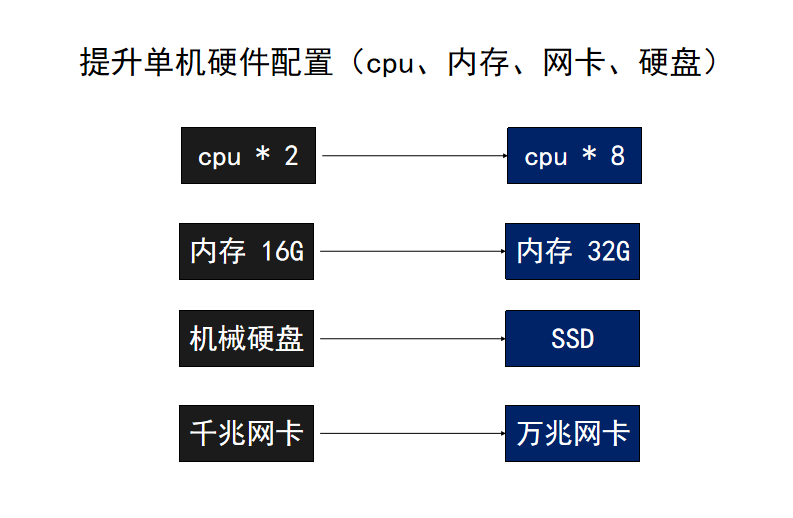
垂直扩展也就是增加我们硬件的配置,就好像是我们给自己的电脑增加内存更换cpu和显卡的方式来让我们自己的电脑性能更高

硬件上的提升遵循着摩尔定律,当价格不变时,集成电路上可容乃的元器件的数目,约每隔18-24个月便会增加一倍,性能也将提升一倍。换言之,同样的钱所能买到的电脑性能,将每隔18-24个月翻一倍以上。但是摩尔定律已经放缓,这也就更加意味着,单机扩展性能提高是有限的,且成本会越来越高。

水平扩展

目前在高并发可用的系统架构中,最优的方案还是水平扩展。理论上,在系统能支持水平扩展的前提下,增加服务器数量,部署更多机器集群,能够带来无限的性能提升。那么,如何将网络请求分布给多个机器去处理呢?

负载均衡

低成本且高效的方式就是通过负载均衡技术将网络请求分布给多个机器去处理。

nginx 一般能够做到10万并发,常用调优手法:
nginx 参数:
进程与CPU绑定worker_cpu_affinity、并发连接数、缓存区、超时时间、压缩、日志

操作系统网络参数:
能打开的最大文件数、net.ipv4.tcp_keepalive_time、tcp缓冲区/proc/sys/net/ipv4/tcp_mem、rmem、wmem

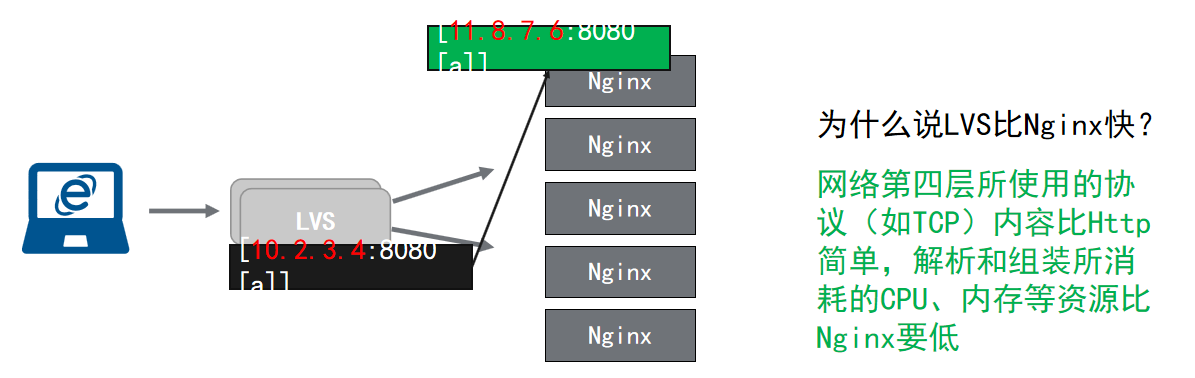
nginx通常用在Http反向代理的场景中,在网络模型中,HTTP属于第7层应用层的协议。HTTP请求的处理包括解析和封装HTTP内容,要处理更多的请求,需要更多的内存、CPU等等资源。高配置的硬件都比较昂贵,那么在囊中羞涩的情况下,通常会组成Nginx集群来获取更高的处理能力。

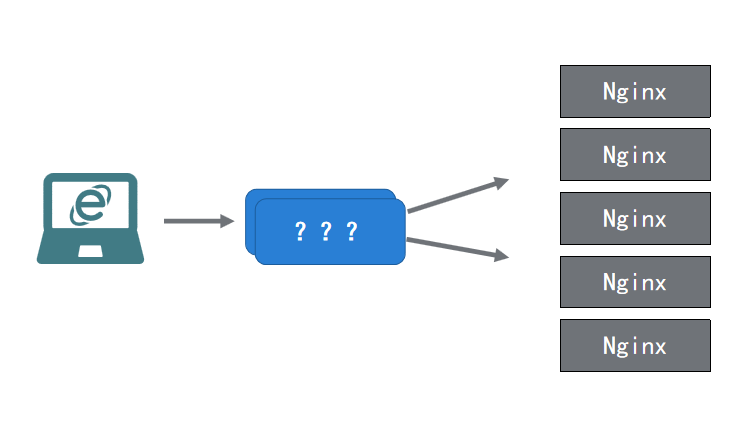
如果面临几十万的并发量,采用Nginx集群:

看了上图会发现,中间的???是什么鬼,我们到底用的什么将请求分发给Nginx集群中的多个机器???

答案是,我们用负载均衡器(LVS)去分发请求,那么LVS又是什么呢?

LVS(Linux Virtual Server), Linux虚拟服务器(重点:这个是中国人开发的),目前绝大部分Linux发行版,都集成到内核了。实现基于第四层(传输层)的软件负载均衡方案。我们可以粗略认为安装使用了LVS的Linux服务器,相当于是快递中转。

核心理念:原本是请求LVS服务器的数据包,被LVS软件篡改了数据包的目的地,将流量转移到了Nginx所在的机器IP,从而实现负载均衡。

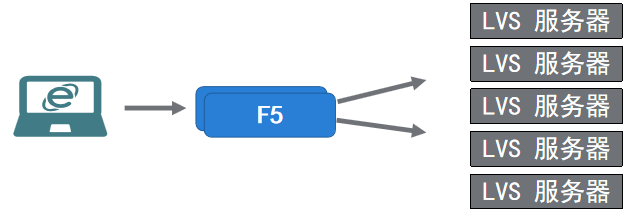
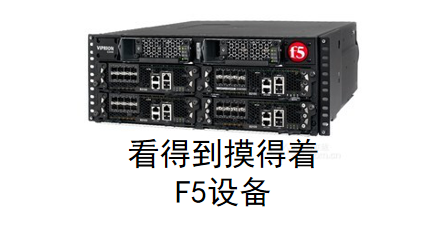
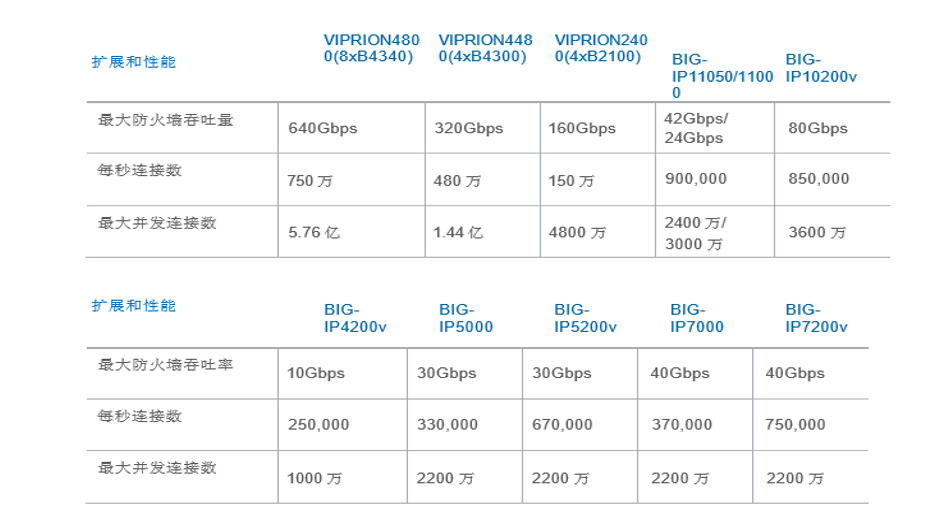
虽然我们有了LVS这一大神器,但是如上图所示LVS的数量也是有上限的,通常也就是图中所示,五个LVS(可能是不谋而合了)。那么LVS有上限了,就没有别的办法了么?当然不是,别忘了我们还有F5的存在(只要钱到位没有什么是解决不了的)

但是纵使是有F5在撑腰,服务端也终有上限。
Nginx 可以支持1w-10w并发
LVS 可以支持10w-50w并发
F5 可以支持200w-1000w并发

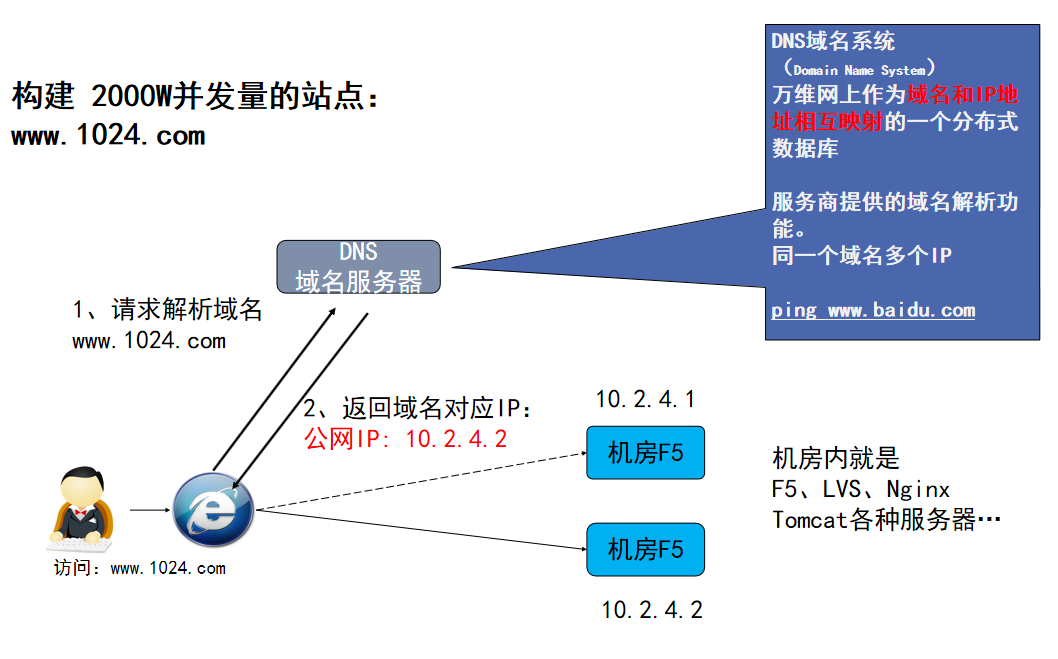
当超过服务器架构设备的上限后,如何实现无限水平扩展?

DNS - 无限水平扩展的终极奥秘

使用由服务商提供的域名解析功能。同一个域名对应多个IP,每个ip给他来一台F5,每台F5来一组LVS集群,每个LVS再分发给一组nginx服务器

vue 权限管理

本篇博客仅以个人学习记录使用
参照开源项目地址:https://github.com/zhangdaiscott/jeecg-boot
对比参照:https://pro.loacg.com/docs/getting-started

产生背景

首先,权限管理并不是随着vue或者react或者angular等技术出现才产生的。早期的web是十分简单的,随着互联网的发展,人们越来越多的使用互联网,使用web作为系统管理,web需求变得越来越复杂,当一个系统需要区分不同的账号,不同的角色,分别有不同的操作使用权限和查看权限的时候,就需要做权限管理,简单的举例说就是区分识别普通用户和vip用户(人民币玩家)。

权限种类

权限控制大体上分为单账号->单角色/单账号->多角色。单账号单角色更简单一些只需要使用账号就可以区分开,单账号多角色还需要针对该账号存在的不同角色再去做区分匹配。同时对于权限控制在页面上也会有更加细粒度的控制,除了浏览权限之外,还有按钮控制权限,还有数据权限。当然权限最大的还是超级管理员,这个人可以肆意妄为。。。

区别

随着单页应用和前后端分离,权限管理的实现方式出现了一些变化,但是思路上大致都是相同的。以往的区分方式是使用session id去匹配出不同的账号和角色,返回相应的展示,这个时候是由服务端去做的,也是根据url地址区分不同的页面,这是多页时代,随着react,angular和vue的兴起,单页应用越来越流行起来,这个时候就不能通过url地址去区分了,因为这个时候的单页应用是前后端分离的,后端不存在路由跳转了,后端只有接口了,所有的路由跳转都是通过前端来实现的,在前端中,前端拥有了自己的路由,也就是前端路由,前端路由去控制跳转,而这个跳转实际上不过是不同模块和组件的切换而已,这个切换的状态会展现在url地址栏当中,这个时候的url也就不同于过去的url了,这个时候的url不负责请求资源,只是作为跳转路径存在,而请求资源都是通过Ajax或者Fetch去实现。因此采用单页应用,由前端渲染的开发方式也就可以不需要使用session了,这时我们便通过Token令牌的方式去更好的实现权限区分(当然使用Token替代session主要原因并不是因为单页应用前端渲染,而是因为不再需要服务端维护session),以往时跳转是在服务端实现的,但是现在是在客户端实现的。前端还需要存储服务端返回的Token,每次执行请求时需要带上这个Token去做验证,同时后端还应设置Token的过期时间,Token过期,返回过期标识,前端跳出进行重新登录。

登录/注销,Token验证及存储实现思路

一般登陆的时候,像后端发送请求,后端会返回token令牌,然后前端将token存存储到localstorage当中(这样方便在登陆之前下获取一次本地token当本地token有效时,直接根据token像后端请求权限路由)。并且在登陆之前还会先有一个全局验证的步骤,而且一般token采用jwt标准生成。

全局权限验证

全局验证思路主要是通过router.beforeEach这个方法,在路由初始化第一次访问路由的时候就开始验证了,具体逻辑看以下代码:

1
2
3
4
5
6
7
8
9
10
11
12
13
14
15
16
17
18
19
20
21
22
23
24
25
26
27
28
29
30
31
32
33
34
35
36
37
38
39
40
41
42
43
44
45
46
47
48
49
50
51
52
53
54
55
56
57
58
59
60
61
62
63
64
65
66
67
68
69
70
71
72
73
74
75
import Vue from 'vue'
import router from './router'
import store from './store'
import NProgress from 'nprogress' // progress bar
import 'nprogress/nprogress.css' // progress bar style
// import notification from 'ant-design-vue/es/notification'
import { ACCESS_TOKEN } from '@/store/mutation-types'
import { generateIndexRouter } from "@/utils/util"

NProgress.configure({ showSpinner: false }) // NProgress Configuration

const whiteList = ['/user/login', '/user/register', '/user/register-result'] // no redirect whitelist

router.beforeEach((to, from, next) => {
NProgress.start() // start progress bar

if (Vue.ls.get(ACCESS_TOKEN)) {
/* has token */
if (to.path === '/user/login') {
next({ path: '/dashboard/workplace' })
NProgress.done()
} else {
if (store.getters.permissionList.length === 0) {
store.dispatch('GetPermissionList').then(res => {
const menuData = res.result.menu;
console.log(res.message)
if (menuData === null || menuData === "" || menuData === undefined) {
return;
}
let constRoutes = [];
constRoutes = generateIndexRouter(menuData);
// 添加主界面路由
store.dispatch('UpdateAppRouter', { constRoutes }).then(() => {
// 根据roles权限生成可访问的路由表
// 动态添加可访问路由表
router.addRoutes(store.getters.addRouters)
const redirect = decodeURIComponent(from.query.redirect || to.path)
if (to.path === redirect) {
// hack方法 确保addRoutes已完成 ,set the replace: true so the navigation will not leave a history record
next({ ...to, replace: true })
} else {
// 跳转到目的路由
next({ path: redirect })
}
})
})
.catch(() => {
/* notification.error({
message: '系统提示',
description: '请求用户信息失败,请重试!'
})*/
// 未请求到权限强制退出重新登录
store.dispatch('Logout').then(() => {
next({ path: '/user/login', query: { redirect: to.fullPath } })
})
})
} else {
next()
}
}
} else {
if (whiteList.indexOf(to.path) !== -1) {
// 在免登录白名单,直接进入
next()
} else {
next({ path: '/user/login', query: { redirect: to.fullPath } })
NProgress.done() // if current page is login will not trigger afterEach hook, so manually handle it
}
}
})

router.afterEach(() => {
NProgress.done() // finish progress bar
})

路由表实现思路

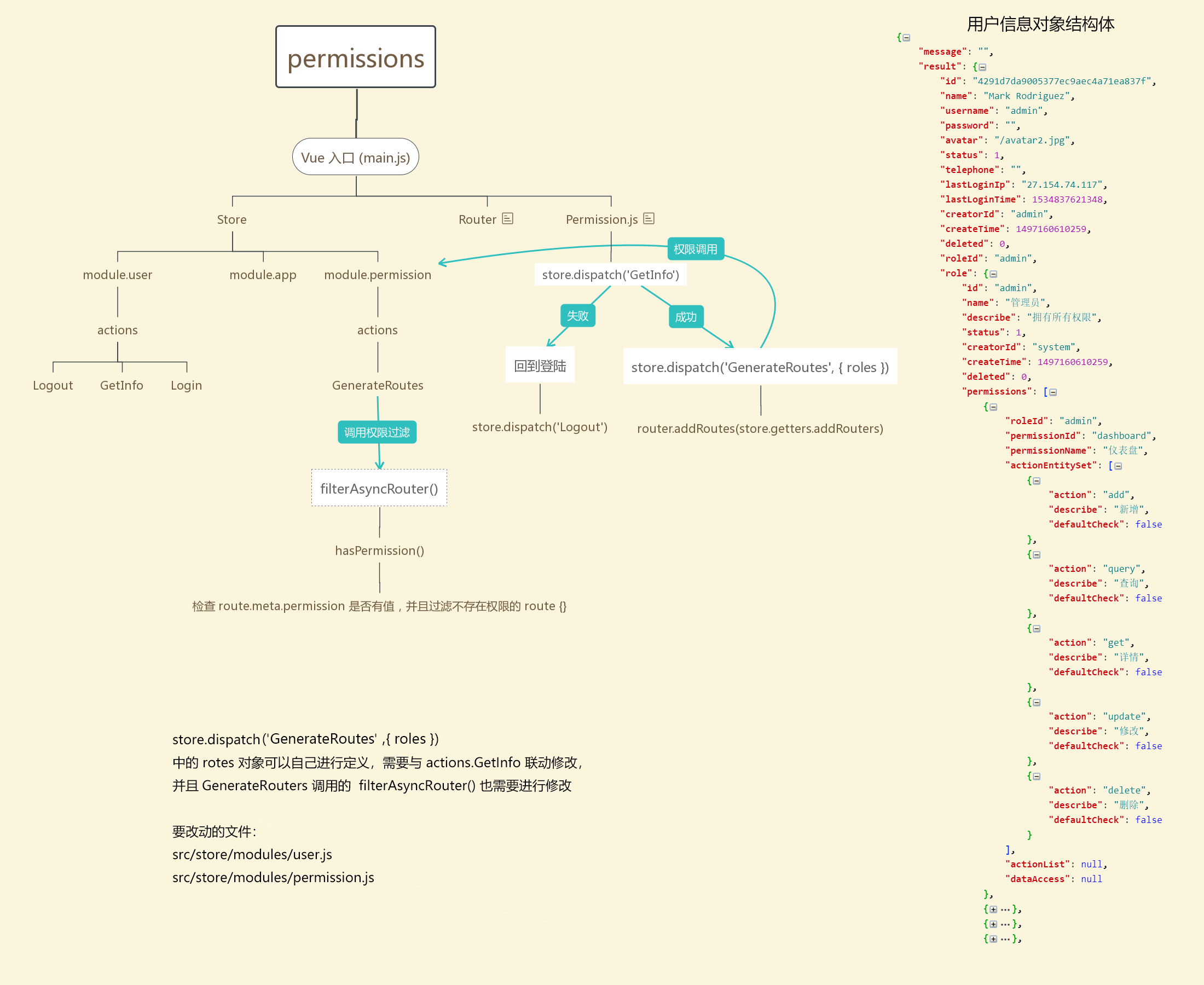
既然路由跳转是在客户端实现的,那么路由表自然也就是在客户端咯??答案是,这也不一定。前端路由是一定要有的,只不过这时在实现上有区别,第一种:前端会保存一份完整的路由表,通过请求后端,由后端返回标志,前端去筛选这份完整的前端路由,找出想要的部分来当做该权限下的路由表使用。第二种:前端只保留基本路由,其他的路由,全部由后端动态的生成,然后传给前端。第一种方式在简单的场景下可以采用,这样不必占用过多的服务器资源,前端路由完全放在前端去维护,更加方便前端去更改,当然在面对复杂的权限管理时问题也会变的十分显著。第二种方式也就是我们所说的动态路由了,这种实现方式完全由后端动态生成返回给前端,前端根据这份路由表去实现权限控制。采用这种方式也更加灵活,无论是简单的权限管理还是复杂的权限管理都可以直接采用这种方式去实现,前端也不需要去维护路由表,这时需要做的就是和后端约定好路由规则,根据需求动态生成路由表,传给前端就可以了。这份路由表当中包括了前端的路由跳转以及权限控制信息。一份完整的路由表可能是这样:

1
2
3
4
5
6
7
8
9
10
11
12
13
14
15
16
17
18
19
20
21
22
23
24
25
26
27
28
29
30
31
32
33
34
35
36
37
38
39
40
41
42
43
44
45
46
47
48
49
50
51
52
53
54
55
56
57
58
59
60
61
62
63
64
65
66
67
68
69
70
71
72
73
74
75
76
77
78
79
80
81
82
83
84
85
86
87
88
89
90
91
92
93
94
95
96
97
98
99
100
101
102
103
104
105
106
107
108
109
110
111
112
113
114
115
116
117
118
119
120
121
122
123
124
125
126
127
128
129
130
131
132
133
134
135
136
137
138
139
140
141
142
143
144
145
146
147
148
149
150
151
152
153
154
155
156
157
158
159
160
161
162
163
164
165
166
167
168
169
170
171
172
173
174
175
176
177
178
179
180
181
182
183
184
185
186
187
188
189
190
191
192
193
194
195
196
197
198
199
200
201
202
203
204
205
206
207
208
209
210
211
212
213
214
215
216
217
218
219
220
221
222
223
224
225
226
227
228
229
230
231
232
233
234
235
236
237
238
239
240
241
242
243
244
245
246
247
248
249
250
251
252
253
254
255
256
257
258
259
260
261
262
263
264
265
266
267
268
269
270
271
272
273
274
275
276
277
278
279
280
281
282
283
284
285
286
287
288
289
290
291
292
293
294
295
296
297
298
299
300
301
302
303
304
305
306
307
308
309
310
311
312
313
314
315
316
317
318
319
320
321
322
323
324
325
326
327
328
329
330
331
332
333
334
335
336
337
338
339
340
341
342
343
344
345
346
347
348
349
350
351
352
353
354
355
356
357
358
359
360
361
362
363
364
365
366
367
368
369
370
371
372
373
374
375
376
377
378
379
380
381
382
383
384
385
386
387
388
389
390
391
392
393
394
395
396
397
398
399
400
401
402
403
404
405
406
407
408
409
410
411
412
413
414
415
416
417
418
419
420
421
422
423
424
425
426
427
428
429
430
431
432
433
434
435
436
437
438
439
440
441
442
443
444
445
446
447
448
449
450
451
452
453
454
455
456
457
458
459
460
461
462
463
464
465
466
467
468
469
470
471
472
473
474
475
476
477
478
479
480
481
482
483
484
485
486
487
488
489
490
491
492
493
494
495
496
497
498
499
500
501
502
503
504
505
506
507
508
509
510
511
512
513
514
515
516
517
518
519
520
521
522
523
524
525
526
527
528
529
530
531
532
533
534
535
536
537
538
539
540
541
542
543
544
545
546
547
548
549
550
551
552
553
554
555
556
557
558
559
560
561
562
563
564
565
566
567
568
569
570
571
572
573
574
575
576
577
578
579
580
581
582
583
584
585
586
587
588
589
590
591
592
593
594
595
596
597
598
599
600
601
602
603
604
605
606
607
608
609
610
611
612
613
614
615
616
617
618
619
620
621
622
623
624
625
626
627
628
629
630
631
632
633
634
635
636
637
638
639
640
641
642
643
644
645
646
647
648
649
650
651
652
653
654
655
656
657
658
659
660
661
662
663
664
665
666
667
668
669
670
671
672
673
674
675
676
677
678
679
680
681
682
683
684
685
686
687
688
689
690
691
692
693
694
695
696
697
698
699
700
701
702
703
704
705
706
707
708
709
710
711
712
713
714
715
716
717
718
719
720
721
722
723
724
725
726
727
728
729
730
731
732
733
734
735
736
737
738
739
740
741
742
743
744
745
746
747
748
749
750
751
752
753
754
755
756
757
758
759
760
761
762
763
764
765
766
767
768
769
770
771
772
773
774
775
776
777
778
779
780
781
782
783
784
785
786
787
788
789
790
791
792
793
794
795
796
797
798
799
800
801
802
803
804
805
806
807
808
809
810
811
812
813
814
815
816
817
818
819
820
821
822
823
824
825
826
827
828
829
830
831
832
833
834
835
836
837
838
839
840
841
842
843
844
845
846
847
848
849
850
851
852
853
854
855
856
857
858
859
860
861
862
863
864
865
866
867
868
869
870
871
872
873
874
875
876
877
878
879
880
881
882
883
884
885
886
887
888
889
890
891
892
893
894
895
896
897
898
899
900
901
902
903
904
905
906
907
908
909
910
911
912
913
914
915
916
917
918
919
920
921
922
923
924
925
926
927
928
929
930
931
932
933
934
935
936
937
938
939
940
941
942
943
944
945
946
947
948
949
950
951
952
953
954
955
956
957
958
959
960
961
962
963
964
965
966
967
968
969
970
971
972
973
974
975
976
977
978
979
980
981
982
983
984
985
986
987
988
989
990
991
992
993
994
995
{
"success": true,
"message": "查询成功",
"code": 200,
"result": {
"allAuth": [
{
"action": "user:form:phone",
"describe": "手机号禁用",
"type": "2",
"status": "1"
},
{
"action": "user:add",
"describe": "添加用户按钮",
"type": "1",
"status": "1"
}
],
"auth": [
{
"action": "user:form:phone",
"describe": "手机号禁用",
"type": "2"
},
{
"action": "user:add",
"describe": "添加用户按钮",
"type": "1"
}
],
"menu": [
{
"redirect": null,
"path": "/dashboard/analysis",
"component": "dashboard/Analysis",
"route": "1",
"meta": {
"keepAlive": "true",
"icon": "home",
"title": "首页"
},
"name": "dashboard-analysis",
"id": "9502685863ab87f0ad1134142788a385"
},
{
"redirect": null,
"path": "/report",
"component": "layouts/RouteView",
"route": "1",
"children": [
{
"path": "/report/ArchivesStatisticst",
"component": "jeecg/report/ArchivesStatisticst",
"route": "1",
"meta": {
"keepAlive": "true",
"title": "布局统计报表"
},
"name": "report-ArchivesStatisticst",
"id": "2aeddae571695cd6380f6d6d334d6e7d"
},
{
"path": "/report/ViserChartDemo",
"component": "jeecg/report/ViserChartDemo",
"route": "1",
"meta": {
"keepAlive": "true",
"title": "ViserChartDemo"
},
"name": "report-ViserChartDemo",
"id": "020b06793e4de2eee0007f603000c769"
}
],
"meta": {
"keepAlive": "true",
"icon": "bar-chart",
"title": "统计报表"
},
"name": "report",
"id": "f0675b52d89100ee88472b6800754a08"
},
{
"redirect": null,
"path": "/isystem",
"component": "layouts/RouteView",
"route": "1",
"children": [
{
"path": "/isystem/user",
"component": "system/UserList",
"route": "1",
"meta": {
"keepAlive": "true",
"title": "用户管理"
},
"name": "isystem-user",
"id": "3f915b2769fc80648e92d04e84ca059d"
},
{
"path": "/isystem/depart",
"component": "system/DepartList",
"route": "1",
"meta": {
"keepAlive": "true",
"title": "部门管理"
},
"name": "isystem-depart",
"id": "45c966826eeff4c99b8f8ebfe74511fc"
},
{
"path": "/isps/userAnnouncement",
"component": "system/UserAnnouncementList",
"route": "1",
"meta": {
"keepAlive": "true",
"title": "我的消息"
},
"name": "isps-userAnnouncement",
"id": "53a9230444d33de28aa11cc108fb1dba"
},
{
"path": "/system/departUserList",
"component": "system/DepartUserList",
"route": "1",
"meta": {
"keepAlive": "true",
"title": "我的部门"
},
"name": "system-departUserList",
"id": "5c2f42277948043026b7a14692456828"
},
{
"path": "/isystem/role",
"component": "system/RoleList",
"route": "1",
"meta": {
"keepAlive": "true",
"title": "角色管理"
},
"name": "isystem-role",
"id": "e8af452d8948ea49d37c934f5100ae6a"
},
{
"path": "/isystem/permission",
"component": "system/PermissionList",
"route": "1",
"meta": {
"keepAlive": "true",
"title": "菜单管理"
},
"name": "isystem-permission",
"id": "54dd5457a3190740005c1bfec55b1c34"
},
{
"path": "/isystem/dict",
"component": "system/DictList",
"route": "1",
"meta": {
"keepAlive": "true",
"title": "数据字典"
},
"name": "isystem-dict",
"id": "f1cb187abf927c88b89470d08615f5ac"
},
{
"path": "/isystem/annountCement",
"component": "system/SysAnnouncementList",
"route": "1",
"meta": {
"keepAlive": "true",
"title": "系统通告"
},
"name": "isystem-annountCement",
"id": "e08cb190ef230d5d4f03824198773950"
}
],
"meta": {
"keepAlive": "true",
"icon": "setting",
"title": "系统管理"
},
"name": "isystem",
"id": "d7d6e2e4e2934f2c9385a623fd98c6f3"
},
{
"redirect": null,
"path": "/dashboard3",
"component": "layouts/RouteView",
"route": "1",
"children": [
{
"path": "/monitor",
"component": "layouts/RouteView",
"route": "1",
"children": [
{
"path": "/monitor/redis/info",
"component": "modules/monitor/RedisInfo",
"route": "1",
"meta": {
"keepAlive": "true",
"title": "Redis监控"
},
"name": "monitor-redis-info",
"id": "8d1ebd663688965f1fd86a2f0ead3416"
},
{
"path": "/monitor/TomcatInfo",
"component": "modules/monitor/TomcatInfo",
"route": "1",
"meta": {
"keepAlive": "true",
"title": "Tomcat信息"
},
"name": "monitor-TomcatInfo",
"id": "024f1fd1283dc632458976463d8984e1"
},
{
"path": "/monitor/SystemInfo",
"component": "modules/monitor/SystemInfo",
"route": "1",
"meta": {
"keepAlive": "true",
"title": "服务器信息"
},
"name": "monitor-SystemInfo",
"id": "8b3bff2eee6f1939147f5c68292a1642"
},
{
"path": "/monitor/JvmInfo",
"component": "modules/monitor/JvmInfo",
"route": "1",
"meta": {
"keepAlive": "true",
"title": "JVM信息"
},
"name": "monitor-JvmInfo",
"id": "d07a2c87a451434c99ab06296727ec4f"
},
{
"path": "/monitor/HttpTrace",
"component": "modules/monitor/HttpTrace",
"route": "1",
"meta": {
"keepAlive": "true",
"title": "请求追踪"
},
"name": "monitor-HttpTrace",
"id": "fc810a2267dd183e4ef7c71cc60f4670"
},
{
"path": "/monitor/Disk",
"component": "modules/monitor/DiskMonitoring",
"route": "1",
"meta": {
"keepAlive": "true",
"title": "磁盘监控"
},
"name": "monitor-Disk",
"id": "97c8629abc7848eccdb6d77c24bb3ebb"
}
],
"meta": {
"keepAlive": "true",
"title": "性能监控"
},
"name": "monitor",
"id": "700b7f95165c46cc7a78bf227aa8fed3"
},
{
"path": "/isystem/log",
"component": "system/LogList",
"route": "1",
"meta": {
"keepAlive": "true",
"title": "日志管理"
},
"name": "isystem-log",
"id": "58857ff846e61794c69208e9d3a85466"
},
{
"path": "/sys/dataLog-list",
"component": "system/DataLogList",
"route": "1",
"meta": {
"keepAlive": "true",
"title": "数据日志"
},
"name": "sys-dataLog-list",
"id": "841057b8a1bef8f6b4b20f9a618a7fa6"
},
{
"path": "5f22d2592b01c9e964efe70040162b83",
"component": "layouts/IframePageView",
"route": "1",
"meta": {
"keepAlive": "true",
"title": "SQL监控",
"url": "{{ window._CONFIG['domianURL'] }}/druid/"
},
"name": "{{ window._CONFIG['domianURL'] }}-druid-",
"id": "aedbf679b5773c1f25e9f7b10111da73"
},
{
"path": "5388c8fe3cd402f07a4bc39dddc61b30",
"component": "layouts/IframePageView",
"route": "1",
"meta": {
"keepAlive": "true",
"title": "在线文档",
"url": "{{ window._CONFIG['domianURL'] }}/swagger-ui.html#/"
},
"name": "{{ window._CONFIG['domianURL'] }}-swagger-ui.html#-",
"id": "2dbbafa22cda07fa5d169d741b81fe12"
},
{
"path": "/isystem/QuartzJobList",
"component": "system/QuartzJobList",
"route": "1",
"meta": {
"keepAlive": "true",
"title": "定时任务"
},
"name": "isystem-QuartzJobList",
"id": "b1cb0a3fedf7ed0e4653cb5a229837ee"
}
],
"meta": {
"keepAlive": "true",
"icon": "dashboard",
"title": "系统监控"
},
"name": "dashboard3",
"id": "08e6b9dc3c04489c8e1ff2ce6f105aa4"
},
{
"redirect": null,
"path": "/message",
"component": "layouts/RouteView",
"route": "1",
"children": [
{
"path": "/modules/message/sysMessageList",
"component": "modules/message/SysMessageList",
"route": "1",
"meta": {
"keepAlive": "true",
"title": "消息管理"
},
"name": "modules-message-sysMessageList",
"id": "944abf0a8fc22fe1f1154a389a574154"
},
{
"path": "/modules/message/sysMessageTemplateList",
"component": "modules/message/SysMessageTemplateList",
"route": "1",
"meta": {
"keepAlive": "true",
"title": "模板管理"
},
"name": "modules-message-sysMessageTemplateList",
"id": "f780d0d3083d849ccbdb1b1baee4911d"
}
],
"meta": {
"keepAlive": "true",
"icon": "message",
"title": "消息中心"
},
"name": "message",
"id": "5c8042bd6c601270b2bbd9b20bccc68b"
},
{
"redirect": null,
"path": "/jeecg",
"component": "layouts/RouteView",
"route": "1",
"children": [
{
"path": "/jeecg/jeecgDemoList",
"component": "jeecg/JeecgDemoList",
"route": "1",
"meta": {
"keepAlive": "true",
"title": "单表模型示例"
},
"name": "DemoList",
"id": "4148ec82b6acd69f470bea75fe41c357"
},
{
"path": "/jeecg/TableExpandeSub",
"component": "jeecg/TableExpandeSub",
"route": "1",
"meta": {
"keepAlive": "true",
"title": "内嵌Table"
},
"name": "jeecg-TableExpandeSub",
"id": "4356a1a67b564f0988a484f5531fd4d9"
},
{
"path": "/jeecg/ImagPreview",
"component": "jeecg/ImagPreview",
"route": "1",
"meta": {
"keepAlive": "true",
"title": "图片预览"
},
"name": "jeecg-ImagPreview",
"id": "655563cd64b75dcf52ef7bcdd4836953"
},
{
"path": "/jeecg/SelectDemo",
"component": "jeecg/SelectDemo",
"route": "1",
"meta": {
"keepAlive": "true",
"title": "常用选择组件"
},
"name": "jeecg-SelectDemo",
"id": "9a90363f216a6a08f32eecb3f0bf12a3"
},
{
"path": "/jeecg/tablist/JeecgOrderDMainList",
"component": "jeecg/tablist/JeecgOrderDMainList",
"route": "1",
"meta": {
"keepAlive": "true",
"title": "一对多Tab示例"
},
"name": "jeecg-tablist-JeecgOrderDMainList",
"id": "6ad53fd1b220989a8b71ff482d683a5a"
},
{
"path": "/jeecg/JeecgOrderMainList",
"component": "jeecg/JeecgOrderMainList",
"route": "1",
"meta": {
"keepAlive": "true",
"title": "一对多示例"
},
"name": "jeecg-JeecgOrderMainList",
"id": "fb367426764077dcf94640c843733985"
},
{
"path": "/jeecg/JeecgTreeTable",
"component": "jeecg/JeecgTreeTable",
"route": "1",
"meta": {
"keepAlive": "true",
"title": "异步树列表Demo"
},
"name": "jeecg-JeecgTreeTable",
"id": "0620e402857b8c5b605e1ad9f4b89350"
},
{
"path": "/jeecg/JeecgOrderMainListForJEditableTable",
"component": "jeecg/JeecgOrderMainListForJEditableTable",
"route": "1",
"meta": {
"keepAlive": "true",
"title": "一对多JEditable"
},
"name": "jeecg-JeecgOrderMainListForJEditableTable",
"id": "c431130c0bc0ec71b0a5be37747bb36a"
},
{
"path": "/jeecg/jeecgPdfView",
"component": "jeecg/JeecgPdfView",
"route": "1",
"meta": {
"keepAlive": "true",
"title": "PDF预览"
},
"name": "jeecg-jeecgPdfView",
"id": "e1979bb53e9ea51cecc74d86fd9d2f64"
},
{
"path": "/jeecg/PrintDemo",
"component": "jeecg/PrintDemo",
"route": "1",
"meta": {
"keepAlive": "true",
"title": "打印测试"
},
"name": "jeecg-PrintDemo",
"id": "e6bfd1fcabfd7942fdd05f076d1dad38"
},
{
"path": "/jeecg/imgDragSort",
"component": "jeecg/ImgDragSort",
"route": "1",
"meta": {
"keepAlive": "true",
"title": "图片拖拽排序"
},
"name": "jeecg-imgDragSort",
"id": "265de841c58907954b8877fb85212622"
},
{
"path": "/jeecg/helloworld",
"component": "jeecg/helloworld",
"route": "1",
"meta": {
"keepAlive": "true",
"title": "helloworld"
},
"name": "jeecg-helloworld",
"id": "339329ed54cf255e1f9392e84f136901"
},
{
"path": "/jeecg/imgTurnPage",
"component": "jeecg/ImgTurnPage",
"route": "1",
"meta": {
"keepAlive": "true",
"title": "图片翻页"
},
"name": "jeecg-imgTurnPage",
"id": "58b9204feaf07e47284ddb36cd2d8468"
},
{
"path": "bfa89e563d9509fbc5c6503dd50faf2e",
"component": "layouts/IframePageView",
"route": "1",
"meta": {
"keepAlive": "true",
"title": "百度",
"url": "http://www.baidu.com"
},
"name": "http@--www.baidu.com",
"id": "a400e4f4d54f79bf5ce160ae432231af"
},
{
"path": "/jeecg/splitPanel",
"component": "jeecg/SplitPanel",
"route": "1",
"meta": {
"keepAlive": "true",
"title": "分屏"
},
"name": "jeecg-splitPanel",
"id": "3fac0d3c9cd40fa53ab70d4c583821f8"
},
{
"path": "/jeecg/InterfaceTest",
"component": "jeecg/InterfaceTest",
"route": "1",
"meta": {
"keepAlive": "true",
"title": "数据回执模拟"
},
"name": "jeecg-InterfaceTest",
"id": "c6cf95444d80435eb37b2f9db3971ae6"
},
{
"path": "/jeecg/JEditableTable",
"component": "jeecg/JeecgEditableTableExample",
"route": "1",
"meta": {
"keepAlive": "true",
"title": "JEditableTable示例"
},
"name": "jeecg-JEditableTable",
"id": "7960961b0063228937da5fa8dd73d371"
}
],
"meta": {
"keepAlive": "true",
"icon": "qrcode",
"title": "常见案例"
},
"name": "jeecg",
"id": "2a470fc0c3954d9dbb61de6d80846549"
},
{
"redirect": null,
"path": "/result",
"component": "layouts/PageView",
"route": "1",
"children": [
{
"path": "/result/success",
"component": "result/Success",
"route": "1",
"meta": {
"keepAlive": "true",
"title": "成功"
},
"name": "result-success",
"id": "00a2a0ae65cdca5e93209cdbde97cbe6"
},
{
"path": "/result/fail",
"component": "result/Error",
"route": "1",
"meta": {
"keepAlive": "true",
"title": "失败"
},
"name": "result-fail",
"id": "13212d3416eb690c2e1d5033166ff47a"
}
],
"meta": {
"keepAlive": "true",
"icon": "check-circle-o",
"title": "结果页"
},
"name": "result",
"id": "2e42e3835c2b44ec9f7bc26c146ee531"
},
{
"redirect": null,
"path": "/profile",
"component": "layouts/RouteView",
"route": "1",
"children": [
{
"path": "/profile/basic",
"component": "profile/basic/Index",
"route": "1",
"meta": {
"keepAlive": "true",
"title": "基础详情页"
},
"name": "profile-basic",
"id": "cc50656cf9ca528e6f2150eba4714ad2"
},
{
"path": "/profile/advanced",
"component": "profile/advanced/Advanced",
"route": "1",
"meta": {
"keepAlive": "true",
"title": "高级详情页"
},
"name": "profile-advanced",
"id": "b3c824fc22bd953e2eb16ae6914ac8f9"
}
],
"meta": {
"keepAlive": "true",
"icon": "profile",
"title": "详情页"
},
"name": "profile",
"id": "4875ebe289344e14844d8e3ea1edd73f"
},
{
"redirect": null,
"path": "/exception",
"component": "layouts/RouteView",
"route": "1",
"children": [
{
"path": "/exception/403",
"component": "exception/403",
"route": "1",
"meta": {
"keepAlive": "true",
"title": "403"
},
"name": "exception-403",
"id": "65a8f489f25a345836b7f44b1181197a"
},
{
"path": "/exception/404",
"component": "exception/404",
"route": "1",
"meta": {
"keepAlive": "true",
"title": "404"
},
"name": "exception-404",
"id": "d2bbf9ebca5a8fa2e227af97d2da7548"
},
{
"path": "/exception/500",
"component": "exception/500",
"route": "1",
"meta": {
"keepAlive": "true",
"title": "500"
},
"name": "exception-500",
"id": "b4dfc7d5dd9e8d5b6dd6d4579b1aa559"
}
],
"meta": {
"keepAlive": "true",
"icon": "warning",
"title": "异常页"
},
"name": "exception",
"id": "c65321e57b7949b7a975313220de0422"
},
{
"redirect": "/list/query-list",
"path": "/list",
"component": "layouts/PageView",
"route": "1",
"children": [
{
"path": "/list/query-list",
"component": "list/TableList",
"route": "1",
"meta": {
"keepAlive": "true",
"title": "查询表格"
},
"name": "list-query-list",
"id": "418964ba087b90a84897b62474496b93"
},
{
"path": "/list/edit-table",
"component": "list/TableInnerEditList",
"route": "1",
"meta": {
"keepAlive": "true",
"title": "内联编辑表格"
},
"name": "list-edit-table",
"id": "ae4fed059f67086fd52a73d913cf473d"
},
{
"path": "/list/user-list",
"component": "list/UserList",
"route": "1",
"meta": {
"keepAlive": "true",
"title": "用户列表"
},
"name": "list-user-list",
"id": "05b3c82ddb2536a4a5ee1a4c46b5abef"
},
{
"path": "/list/role-list",
"component": "list/RoleList",
"route": "1",
"meta": {
"keepAlive": "true",
"title": "角色列表"
},
"name": "list-role-list",
"id": "4f84f9400e5e92c95f05b554724c2b58"
},
{
"path": "/list/permission-list",
"component": "list/PermissionList",
"route": "1",
"meta": {
"keepAlive": "true",
"title": "权限列表"
},
"name": "list-permission-list",
"id": "73678f9daa45ed17a3674131b03432fb"
},
{
"path": "/list/basic-list",
"component": "list/StandardList",
"route": "1",
"meta": {
"keepAlive": "true",
"title": "标准列表"
},
"name": "list-basic-list",
"id": "f23d9bfff4d9aa6b68569ba2cff38415"
},
{
"path": "/list/card",
"component": "list/CardList",
"route": "1",
"meta": {
"keepAlive": "true",
"title": "卡片列表"
},
"name": "list-card",
"id": "7ac9eb9ccbde2f7a033cd4944272bf1e"
},
{
"path": "/list/search",
"component": "list/search/SearchLayout",
"route": "1",
"children": [
{
"path": "/list/search/article",
"component": "list/TableList",
"route": "1",
"meta": {
"keepAlive": "true",
"title": "搜索列表(文章)"
},
"name": "list-search-article",
"id": "078f9558cdeab239aecb2bda1a8ed0d1"
},
{
"path": "/list/search/application",
"component": "list/TableList",
"route": "1",
"meta": {
"keepAlive": "true",
"title": "搜索列表(应用)"
},
"name": "list-search-application",
"id": "200006f0edf145a2b50eacca07585451"
},
{
"path": "/list/search/project",
"component": "list/TableList",
"route": "1",
"meta": {
"keepAlive": "true",
"title": "搜索列表(项目)"
},
"name": "list-search-project",
"id": "de13e0f6328c069748de7399fcc1dbbd"
}
],
"meta": {
"keepAlive": "true",
"title": "搜索列表"
},
"name": "list-search",
"id": "fb07ca05a3e13674dbf6d3245956da2e"
}
],
"meta": {
"keepAlive": "true",
"icon": "table",
"title": "列表页"
},
"name": "list",
"id": "540a2936940846cb98114ffb0d145cb8"
},
{
"redirect": null,
"path": "/account",
"component": "layouts/RouteView",
"route": "1",
"children": [
{
"path": "/account/center",
"component": "account/center/Index",
"route": "1",
"meta": {
"keepAlive": "true",
"title": "个人中心"
},
"name": "account-center",
"id": "d86f58e7ab516d3bc6bfb1fe10585f97"
},
{
"path": "/account/settings/base",
"component": "account/settings/Index",
"route": "1",
"children": [
{
"path": "/account/settings/base",
"component": "account/settings/BaseSetting",
"route": "1",
"hidden": true,
"meta": {
"keepAlive": "true",
"title": "基本设置"
},
"name": "account-settings-base",
"id": "1367a93f2c410b169faa7abcbad2f77c"
},
{
"path": "/account/settings/binding",
"component": "account/settings/Binding",
"route": "1",
"meta": {
"keepAlive": "true",
"title": "账户绑定"
},
"name": "account-settings-binding",
"id": "4f66409ef3bbd69c1d80469d6e2a885e"
},
{
"path": "/account/settings/custom",
"component": "account/settings/Custom",
"route": "1",
"meta": {
"keepAlive": "true",
"title": "个性化设置"
},
"name": "account-settings-custom",
"id": "882a73768cfd7f78f3a37584f7299656"
},
{
"path": "/account/settings/security",
"component": "account/settings/Security",
"route": "1",
"meta": {
"keepAlive": "true",
"title": "安全设置"
},
"name": "account-settings-security",
"id": "ec8d607d0156e198b11853760319c646"
},
{
"path": "/account/settings/notification",
"component": "account/settings/Notification",
"route": "1",
"meta": {
"keepAlive": "true",
"title": "新消息通知"
},
"name": "account-settings-notification",
"id": "fedfbf4420536cacc0218557d263dfea"
}
],
"meta": {
"keepAlive": "true",
"title": "个人设置"
},
"name": "account-settings-base",
"id": "6e73eb3c26099c191bf03852ee1310a1",
"alwaysShow": true
},
{
"path": "/dashboard/workplace",
"component": "dashboard/Workplace",
"route": "1",
"meta": {
"keepAlive": "true",
"title": "工作台"
},
"name": "dashboard-workplace",
"id": "8fb8172747a78756c11916216b8b8066"
}
],
"meta": {
"keepAlive": "true",
"icon": "user",
"title": "个人页"
},
"name": "account",
"id": "717f6bee46f44a3897eca9abd6e2ec44"
},
{
"redirect": null,
"path": "/form",
"component": "layouts/PageView",
"route": "1",
"children": [
{
"path": "/form/base-form",
"component": "form/BasicForm",
"route": "1",
"meta": {
"keepAlive": "true",
"title": "基础表单"
},
"name": "form-base-form",
"id": "277bfabef7d76e89b33062b16a9a5020"
},
{
"path": "/form/step-form",
"component": "form/stepForm/StepForm",
"route": "1",
"meta": {
"keepAlive": "true",
"title": "分步表单"
},
"name": "form-step-form",
"id": "6531cf3421b1265aeeeabaab5e176e6d"
},
{
"path": "/form/advanced-form",
"component": "form/advancedForm/AdvancedForm",
"route": "1",
"meta": {
"keepAlive": "true",
"title": "高级表单"
},
"name": "form-advanced-form",
"id": "e5973686ed495c379d829ea8b2881fc6"
}
],
"meta": {
"keepAlive": "true",
"icon": "form",
"title": "表单页"
},
"name": "form",
"id": "e3c13679c73a4f829bcff2aba8fd68b1"
}
]
},
"timestamp": 1558921538231
}

完整字段可能长这样:

1
2
3
4
5
6
7
8
9
10
11
12
13
14
15
16
/**
* 路由配置说明:
* 建议:sider menu 请不要超过三级菜单,若超过三级菜单,则应该设计为顶部主菜单 配合左侧次级菜单
*
**/
{
redirect: noredirect,
name: 'router-name',
hidden: true,
meta: {
title: 'title',
icon: 'a-icon',
keepAlive: true,
hiddenHeaderContent: true,
}
}

下面就对字段进行详细说明:

{ Route } 对象

参数 说明 类型 默认值
hidden 控制路由是否显示在sidebar boolean false
redirect 重定向地址,访问这个路由时,自动进行重定向 string -
name 路由名称,建议设置,且不能重名 string
meta 路由元信息(路由附带扩展信息) object {}

{ Meta } 路由元信息对象

参数 说明 类型 默认值
title 路由标题,用于显示面包屑,页面标题*推荐设置 string -
icon 路由在menu上显示的图标 string -
keepAlive 缓存该路由 boolean false
hiddenHeaderContent *特殊 隐藏 PageHeader 组件中的页面带的 面包屑和页面标题栏 boolean false
permission 与项目提供的权限拦截匹配的权限,如果不匹配,则会被禁止访问该路由页面 array []

路由例子

1
2
3
4
5
6
7
8
9
10
11
12
13
14
15
16
17
18
19
20
21
22
23
24
25
26
27
28
29
30
31
32
33
34
35
36
37
38
39
40
41
42
43
44
45
46
47
48
49
50
51
52
53
54
55
56
57
58
59
60
61
62
63
64
65
const asyncRouterMap = [
{
path: '/',
name: 'index',
component: BasicLayout,
meta: { title: '首页' },
redirect: '/dashboard/analysis',
children: [
{
path: '/dashboard',
component: Layout,
name: 'dashboard',
redirect: '/dashboard/workplace',
meta: {title: '仪表盘', icon: 'dashboard', permission: ['dashboard']},
children: [
{
path: '/dashboard/analysis',
name: 'Analysis',
component: () => import('@/views/dashboard/Analysis'),
meta: {title: '分析页', permission: ['dashboard']}
},
{
path: '/dashboard/monitor',
name: 'Monitor',
hidden: true,
component: () => import('@/views/dashboard/Monitor'),
meta: {title: '监控页', permission: ['dashboard']}
},
{
path: '/dashboard/workplace',
name: 'Workplace',
component: () => import('@/views/dashboard/Workplace'),
meta: {title: '工作台', permission: ['dashboard']}
}
]
},

// result
{
path: '/result',
name: 'result',
component: PageView,
redirect: '/result/success',
meta: { title: '结果页', icon: 'check-circle-o', permission: [ 'result' ] },
children: [
{
path: '/result/success',
name: 'ResultSuccess',
component: () => import(/* webpackChunkName: "result" */ '@/views/result/Success'),
// 该页面隐藏面包屑和页面标题栏
meta: { title: '成功', hiddenHeaderContent: true, permission: [ 'result' ] }
},
{
path: '/result/fail',
name: 'ResultFail',
component: () => import(/* webpackChunkName: "result" */ '@/views/result/Error'),
// 该页面隐藏面包屑和页面标题栏
meta: { title: '失败', hiddenHeaderContent: true, permission: [ 'result' ] }
}
]
},
...
]
},
]

按钮级权限控制

按钮的权限控制通过注册一个指令去实现验证,但是单单靠一个指令,有时候并不能完全满足,所以还会需要配合v-if

1
2
//v-has 
<a-button @click="handleAdd" v-has="'user:add'" type="primary" icon="plus">添加用户</a-button>
1
2
3
4
5
6
7
8
9
10
11
12
13
14
15
16
17
18
19
20
21
22
23
24
25
26
27
28
29
30
31
32
33
34
35
36
37
38
39
40
41
42
43
44
45
46
47
48
49
50
51
52
53
54
55
56
57
58
59
60
61
62
63
64
65
66
67
68
69
70
71
72
73
74
75
76
77
78
79
80
81
82
83
84
85
86
87
88
89
90
91
92
93
94
95
96
97
98
99
100
101
102
103
104
105
106
107
108
109
110
111
112
113
114
115
116
import { USER_AUTH,SYS_BUTTON_AUTH } from "@/store/mutation-types"

const hasPermission = {
install (Vue, options) {
console.log(options);
Vue.directive('has', {
inserted: (el, binding, vnode)=>{
console.log("页面权限控制----");
//节点权限处理,如果命中则不进行全局权限处理
if(!filterNodePermission(el, binding, vnode)){
filterGlobalPermission(el, binding, vnode);
}
}
});
}
};

/**
* 全局权限控制
*/
export function filterNodePermission(el, binding, vnode) {
console.log("页面权限--NODE--");

var permissionList = [];
try {
var obj = vnode.context.$props.formData;
if (obj) {
let bpmList = obj.permissionList;
for (var bpm of bpmList) {
if(bpm.type != '2') {
permissionList.push(bpm);
}
}
}
} catch (e) {
//console.log("页面权限异常----", e);
}
if (permissionList === null || permissionList === "" || permissionList === undefined||permissionList.length<=0) {
//el.parentNode.removeChild(el)
return false;
}
let permissions = [];
for (var item of permissionList) {
if(item.type != '2') {
permissions.push(item.action);
}
}
//console.log("页面权限----"+permissions);
//console.log("页面权限----"+binding.value);
if (!permissions.includes(binding.value)) {
//el.parentNode.removeChild(el)
return false;
}else{
for (var item2 of permissionList) {
if(binding.value === item2.action){
return true;
}
}
}
return false;
}

/**
* 全局权限控制
*/
export function filterGlobalPermission(el, binding, vnode) {
console.log("页面权限--Global--");

var permissionList = [];
var allPermissionList = [];

//let authList = Vue.ls.get(USER_AUTH);
let authList = JSON.parse(sessionStorage.getItem(USER_AUTH) || "[]");
for (var auth of authList) {
if(auth.type != '2') {
permissionList.push(auth);
}
}
//console.log("页面权限--Global--",sessionStorage.getItem(SYS_BUTTON_AUTH));
let allAuthList = JSON.parse(sessionStorage.getItem(SYS_BUTTON_AUTH) || "[]");
for (var gauth of allAuthList) {
if(gauth.type != '2') {
allPermissionList.push(gauth);
}
}
//设置全局配置是否有命中
var invalidFlag = false;//无效命中
if(allPermissionList != null && allPermissionList != "" && allPermissionList != undefined && allPermissionList.length > 0){
for (var itemG of allPermissionList) {
if(binding.value === itemG.action){
if(itemG.status == '0'){
invalidFlag = true;
break;
}
}
}
}
if(invalidFlag){
return;
}
if (permissionList === null || permissionList === "" || permissionList === undefined||permissionList.length<=0) {
el.parentNode.removeChild(el);
return;
}
let permissions = [];
for (var item of permissionList) {
if(item.type != '2'){
permissions.push(item.action);
}
}
if (!permissions.includes(binding.value)) {
el.parentNode.removeChild(el);
}
}

export default hasPermission;

理解 cookie、session、token

本篇博客仅以个人学习记录使用
原文作者:墨颜丶
原文链接:http://www.cnblogs.com/moyand/p/9047978.html

long long ago!!!

1.Web的功能就是用来浏览,鉴于此时Web的功力如此浅薄,服务器并不需要记录谁在某一段时间里都浏览了什么东西,每次请求都是一个新的HTTP协议,也不需要知道是谁发的请求,仅仅是发送请求然后进行响应.   Each request is new!

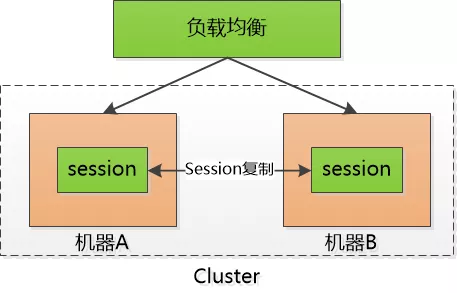
2.随着交互Web应用的流行,在线购物网站,需要登录的网站,vip用户,vvip用户,vvvip。。。等网站的到来,就产生了一个不得不面对的问题,我们必须要记住都有哪些人登录了系统,这时就需要对会话进行管理了。也就是说哪些人登录了系统,哪些人往自己的购物车中放商品,我们必须把每个人区分开。但是因为HTTP是无状态的协议,想利用HTTP去做区分是不现实的,这时就有一个聪明人,想到了一个办法,由服务器给大家发一个会话的标识(session id),说白了就是一个随机字符串,每个人接收到的都不一样,每次浏览器发起HTTP请求的时候都要把这个字符串(session id)一并带过去,这样就能利用这个唯一的字符串区分赵钱孙李了。这时浏览器需要保存自己的这个session id 当然这对于浏览器来说简直是小case,但是对于服务器而言就是个大麻烦了,服务器需要保存所有的session id!!如果访问的人越来越多,就发展到成千上万个了,这对于服务器是一个很大的开销,严重的限制了服务器的扩展能力。这时我们把这些session id 放在了A服务器上,这时一个请求过来,通过这个服务器进行访问,当下一次这个请求又过来了,如果这时被分发到了B服务器,那么就访问不到了,因为这些session id 只在A服务器上,B服务器上并没有这些session id。这时可能会使用沾滞技术,使其一直请求的都是A服务器,但是如果A服务器宕机了,还是会转发到其他的服务器上,这个时候可能采取快照的方式,将这些session id来回的复制粘贴,在多个服务器之间搬来搬去,快累死了。。

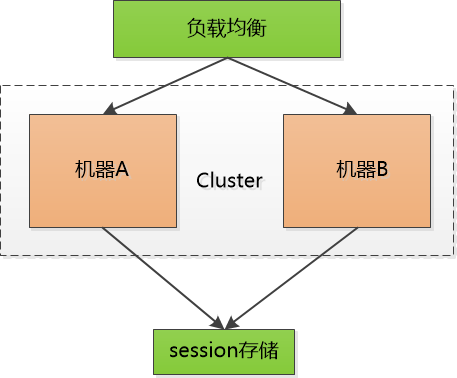
3.后来又把session id 集中存储到一个地方, 所有的机器都来访问这个地方的数据, 这样一来,就不用复制了, 但是增加了单点失败的可能性, 要是那个负责session 的机器挂了, 所有人都得重新登录一遍, 估计得被人骂死。


也尝试把这个单点的机器也做成集群,增加可靠性,但是不管如何,小session终究还是负担。

4.这时就有人思考,为什么要将session保存在服务器,只让每个客户端去保存不好么??

可是如果不保存这些session id , 怎么验证客户端发给我的session id 的确是我生成的呢? 如果不去验证,我们都不知道他们是不是合法登录的用户, 那些不怀好意的家伙们就可以伪造session id , 为所欲为了。

所以,所以,所以,关键点在于验证!!

比如说老王登陆了系统,服务器给他发了一个令牌(token),里边包含了老王的user_id,下一次老王再次通过HTTP请求访问的时候,把这个token带过去就可以了啊。但是这和session id本质上没有什么区别,任何人都可以伪造,必须得让别人伪造不了

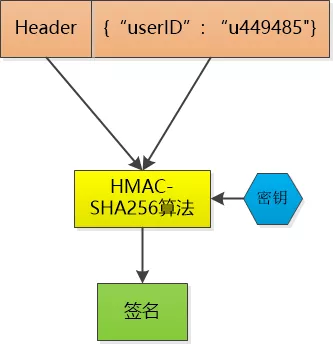
那就对数据做一个签名吧, 比如说我用HMAC-SHA256 算法,加上一个只有我才知道的密钥, 对数据做一个签名, 把这个签名和数据一起作为token , 由于密钥别人不知道, 就无法伪造token了。

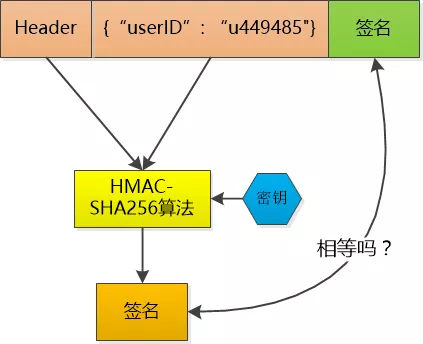
这个token 服务器不保存, 当老王把这个token 给服务器发过去的时候,服务器再用同样的HMAC-SHA256 算法和同样的密钥,对数据再计算一次签名, 和token 中的签名做个比较, 如果相同, 我就知道老王已经登录过了,并且可以直接取到老王的user_id , 如果不相同, 数据部分肯定被人篡改过, 我就告诉发送者:对不起,没有认证。

Token 中的数据是明文保存的(虽然会用Base64做下编码, 但那不是加密), 还是可以被别人看到的, 所以不能在其中保存像密码这样的敏感信息。

当然, 如果一个人的token 被别人偷走了, 那也没办法, 也仍然会认为小偷就是合法用户, 这其实和一个人的session id 被别人偷走是一样的。

这样一来, 服务器就不需要保存session id 了, 服务器只是生成token , 然后验证token , 然后用CPU计算时间解放了session 存储空间 !

解除了session id这个负担, 可以说是无事一身轻, 服务器的机器集群现在可以轻松地做水平扩展, 用户访问量增大, 直接加机器就行。这种无状态的感觉实在是太好了!

cookie 是一个非常具体的东西,指的就是浏览器里面能永久存储的一种数据,仅仅是浏览器实现的一种数据存储功能。

cookie由服务器生成,发送给浏览器,浏览器把cookie以kv形式保存到某个目录下的文本文件内,下一次请求同一网站时会把该cookie发送给服务器。由于cookie是存在客户端上的,所以浏览器加入了一些限制确保cookie不会被恶意使用,同时不会占据太多磁盘空间,所以每个域的cookie数量是有限的。

session

session 从字面上讲,就是会话。这个就类似于你和一个人交谈,你怎么知道当前和你交谈的是张三而不是李四呢?对方肯定有某种特征(长相等)表明他就是张三。

session 也是类似的道理,服务器要知道当前发请求给自己的是谁。为了做这种区分,服务器就要给每个客户端分配不同的“身份标识”,然后客户端每次向服务器发请求的时候,都带上这个“身份标识”,服务器就知道这个请求来自于谁了。至于客户端怎么保存这个“身份标识”,可以有很多种方式,对于浏览器客户端,大家都默认采用 cookie 的方式。

服务器使用session把用户的信息临时保存在了服务器上,用户离开网站后session会被销毁。这种用户信息存储方式相对cookie来说更安全,可是session有一个缺陷:如果web服务器做了负载均衡,那么下一个操作请求到了另一台服务器的时候session会丢失。(所以一般都会做session复制,同步等措施)

Token

在Web领域基于Token的身份验证随处可见。在大多数使用Web API的互联网公司中,tokens 是多用户下处理认证的最佳方式。

以下几点特性会让你在程序中使用基于Token的身份验证

1.无状态、可扩展
2.支持移动设备
3.跨程序调用
4.安全

大部分你见到过的API和Web应用都使用tokens。例如Facebook, Twitter, Google+, GitHub等。

Token的起源

在介绍基于Token的身份验证原理与优势之前,不妨先看看之前的认证都是怎么做的。

基于服务器的验证:

我们都是知道HTTP协议是无状态的,这种无状态意味着程序需要验证每一次请求,从而辨别客户端的身份。

在这之前,程序都是通过在服务端存储的登录信息来辨别请求的。这种方式一般都是通过存储Session来完成。

随着Web,应用程序,已经移动端的兴起,这种验证的方式逐渐暴露出了问题。尤其是在可扩展性方面。

基于服务器验证方式暴露的一些问题:

1.Seesion:每次认证用户发起请求时,服务器需要去创建一个记录来存储信息。当越来越多的用户发请求时,内存的开销也会不断增加。

2.可扩展性:在服务端的内存中使用Seesion存储登录信息,伴随而来的是可扩展性问题。

3.CORS(跨域资源共享):当我们需要让数据跨多台移动设备上使用时,跨域资源的共享会是一个让人头疼的问题。在使用Ajax抓取另一个域的资源,就可以会出现禁止请求的情况。

4.CSRF(跨站请求伪造):用户在访问银行网站时,他们很容易受到跨站请求伪造的攻击,并且能够被利用其访问其他的网站。

在这些问题中,可扩展性是最突出的。因此我们有必要去寻求一种更有行之有效的方法。

基于Token的验证原理:

基于Token的身份验证是无状态的,我们不将用户信息存在服务器或Session中。

这种概念解决了在服务端存储信息时的许多问题

1
NoSession意味着你的程序可以根据需要去增减机器,而不用去担心用户是否登录。

基于Token的身份验证的过程如下:

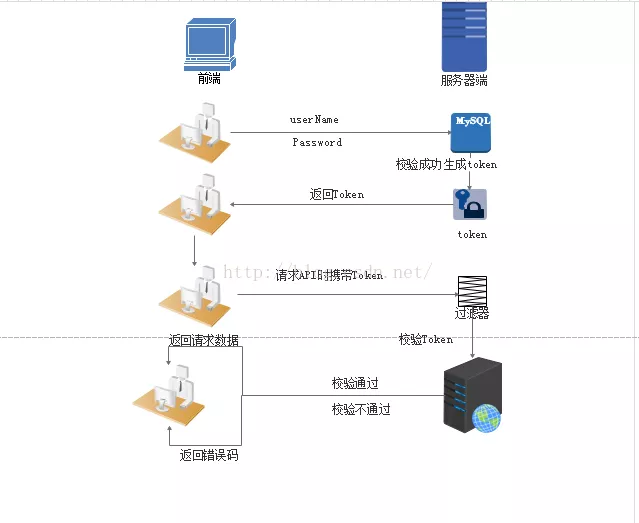
1.用户通过用户名和密码发送请求。
2.程序验证。
3.程序返回一个签名的token 给客户端。
4.客户端储存token,并且每次用于每次发送请求。
5.服务端验证token并返回数据。

每一次请求都需要token。token应该在HTTP的头部发送从而保证了Http请求无状态。我们同样通过设置服务器属性Access-Control-Allow-Origin:* ,让服务器能接受到来自所有域的请求。

需要注意的是,在ACAO头部标明(designating)*时,不得带有像HTTP认证,客户端SSL证书和cookies的证书。

实现思路:

1.用户登录校验,校验成功后就返回Token给客户端。
2.客户端收到数据后保存在客户端
3.客户端每次访问API是携带Token到服务器端。
4.服务器端采用filter过滤器校验。校验成功则返回请求数据,校验失败则返回错误码

当我们在程序中认证了信息并取得token之后,我们便能通过这个Token做许多的事情。

我们甚至能基于创建一个基于权限的token传给第三方应用程序,这些第三方程序能够获取到我们的数据(当然只有在我们允许的特定的token)

Tokens的优势

无状态、可扩展

在客户端存储的Tokens是无状态的,并且能够被扩展。基于这种无状态和不存储Session信息,负载负载均衡器能够将用户信息从一个服务传到其他服务器上。

如果我们将已验证的用户的信息保存在Session中,则每次请求都需要用户向已验证的服务器发送验证信息(称为Session亲和性)。用户量大时,可能会造成一些拥堵。

但是不要着急。使用tokens之后这些问题都迎刃而解,因为tokens自己hold住了用户的验证信息。

安全性

请求中发送token而不再是发送cookie能够防止CSRF(跨站请求伪造)。即使在客户端使用cookie存储token,cookie也仅仅是一个存储机制而不是用于认证。不将信息存储在Session中,让我们少了对session操作。

token是有时效的,一段时间之后用户需要重新验证。我们也不一定需要等到token自动失效,token有撤回的操作,通过token revocataion可以使一个特定的token或是一组有相同认证的token无效。

可扩展性

Tokens能够创建与其它程序共享权限的程序。例如,能将一个随便的社交帐号和自己的大号(Fackbook或是Twitter)联系起来。当通过服务登录Twitter(我们将这个过程Buffer)时,我们可以将这些Buffer附到Twitter的数据流上(we are allowing Buffer to post to our Twitter stream)。

使用tokens时,可以提供可选的权限给第三方应用程序。当用户想让另一个应用程序访问它们的数据,我们可以通过建立自己的API,得出特殊权限的tokens。

多平台跨域

我们提前先来谈论一下CORS(跨域资源共享),对应用程序和服务进行扩展的时候,需要介入各种各种的设备和应用程序。

Having our API just serve data, we can also make the design choice to serve assets from a CDN. This eliminates the issues that CORS brings up after we set a quick header configuration for our application.

只要用户有一个通过了验证的token,数据和资源就能够在任何域上被请求到。

1
Access-Control-Allow-Origin: *